AQG dashboard: protocol and reports
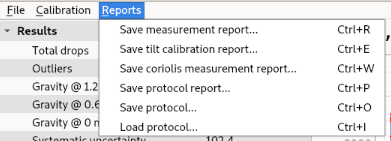
The options for generating reports and saving/loading the measurement protocol are offered in a downdown menu.
Protocol
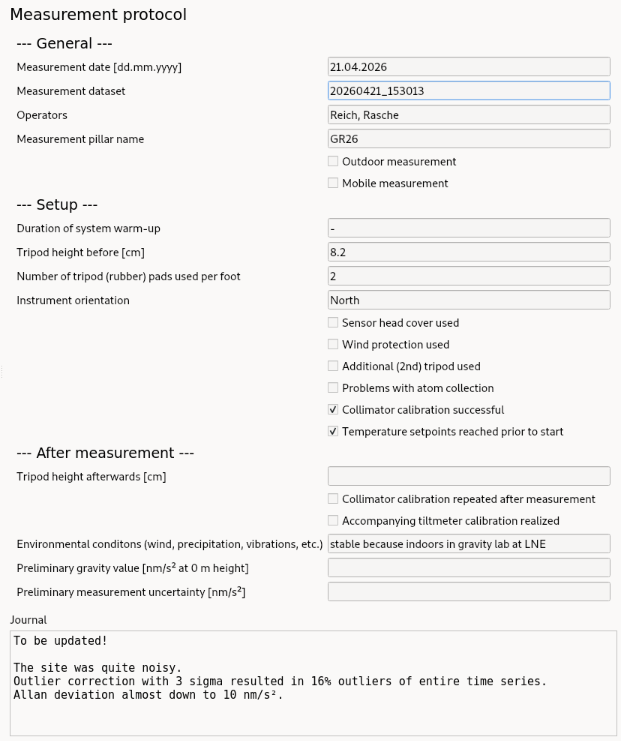
The dashboard provides a way to document measurements.
A minmal set of information, parameters and measurment configuration properties are shown in the right panel of the main window.
The protocol (sub) window can be toggeld with ctrl + j.
No mandatory units or formatting
Up to now, all empty fields are text-fields. This means that there is no specific format required but also no strict format verified for the input. Units are proposed in the field name but it is up to the user what is entered.
Saving, loading and clearing the protocol form
In the above mentioned drop-down menu, the measurement protocol can be saved as a yaml-file. Exiting protocols (in the same format) can be loaded with the respective option.
Above the protocol form there is a button to clear the protocol.
Reports
There are several analysis which can be exported as a pdf-report.
Offered reports: